Notion Spreadsheet: How to Use Notion Like a Spreadsheet (2026)
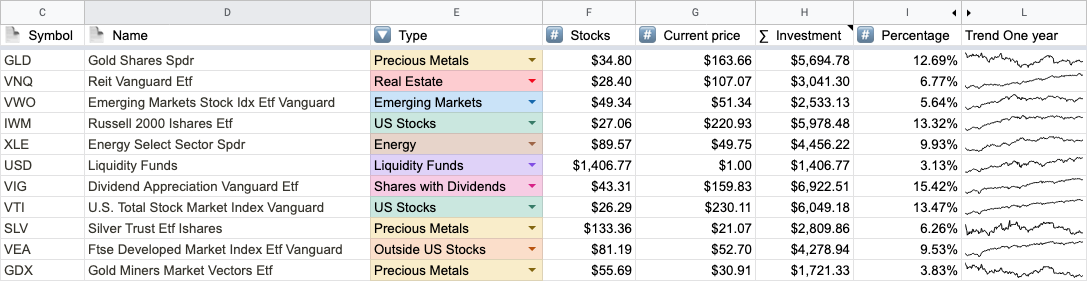
Notion spreadsheet in short: Notion does not have a spreadsheet. It has two grid-shaped things: a simple table, which is a formatted grid of text with no math, and a database in table view, which has typed columns, a per-row formula property, and a calculation row at the bottom. That covers lists and trackers with light totals. For pivot tables, cross-row formulas, or real models, keep the data in a Notion database and sync it to a live Google Sheet, then show the results back in Notion.
People search for a Notion spreadsheet for two reasons. Some want the look: a clean grid on a page. Others want the behavior: sums, formulas, a quick pivot. Notion handles the first well and the second only partly. Here is what each option does and where it stops.
Does Notion have a spreadsheet?
No. There is no spreadsheet block and no cell-level formula anywhere in Notion. This year's table updates didn't change that: simple tables got merged cells in May 2026, and in July Notion Agents learned to generate Excel files from a database. Useful, but neither makes a Notion table behave like a spreadsheet.
What you get instead:
| You want | Use in Notion | Math available |
|---|---|---|
| A tidy grid on a page | Simple table (/table) | None |
| A list you can sort, filter, and total | Database in table view (/table view) | Formula property per row, one calculation per column |
| Real spreadsheet work | A Notion database synced to Google Sheets | Everything Sheets can do |
Option 1: A simple table (looks like a spreadsheet)
Type /table and choose the simple table block, not Table view. You get a plain grid that sits inside the page like a paragraph would. You can turn on a header row or a header column, and since May 2026 merge cells to build headers that span several columns.
That is the whole feature set. A simple table has no column types, no sorting, no filters, and no formulas. Every cell is text. It is the right choice for a price list, a comparison, or a small reference table that a person reads. It is the wrong choice for anything you need to add up.
If you want a simple table on a page that shows numbers calculated somewhere else, Sync2Sheets table blocks can fill one from a range in Google Sheets and keep it updated.
Option 2: A database in table view (works like a spreadsheet, mostly)
Type /table view to create an inline database. It looks like a grid, but each row is a Notion page and each column is a property with a type: number, date, select, person, checkbox, URL, and so on. This is what most people mean when they say they use Notion like a spreadsheet.
Column calculations
At the bottom of every column there is a hidden calculation row. Hover under the last row, click, and open Calculate. Every column can count values, empty cells, and percentages. Number columns add Sum, Average, Median, Min, Max, and Range.
The limits are worth knowing before you build around them. Each column shows one calculation at a time. The result lives only in that footer, so you cannot feed it into another formula or another page. In a grouped view each group gets its own footer, which is the closest Notion gets to a pivot table.
Formulas
A formula property calculates a value for each row from the other properties of that row: prop("Price") * prop("Quantity"), a date difference, a status label built from a few conditions. Notion's formula language is capable inside a row. Through relations and rollups a row can also read from linked pages in another database.
What a Notion formula cannot do:
- Point at a cell. There is no A1, no B2, no range like
A1:A20. - Read the row above. Running totals and balances need workarounds.
- Look across all rows. No
VLOOKUP,SUMIF, orQUERYover the whole table. - Pull outside data. No
GOOGLEFINANCE,IMPORTXML, or currency rates.
Charts
Notion has native charts as a database view. The Free plan gets one chart per workspace and paid plans get unlimited. The Notion charts guide covers the five chart types and the 200-group cap.
What a Notion table can't do (and a spreadsheet can)
| Spreadsheet feature | Notion simple table | Notion database table |
|---|---|---|
| Typed columns | No | Yes |
| Sort and filter | No | Yes |
| Formula in a single cell | No | No, one formula per column |
| Reference another row or range | No | No, only related pages |
| Column totals | No | Yes, one per column, footer only |
| Pivot tables | No | No, grouped views only |
| Lookups across rows | No | No |
| Live outside data | No | No |
| Charts | No | Yes, one on Free, unlimited on paid |
If most of your checklist lands in the right column, a Notion database is enough. If the deal-breakers are pivots, lookups, or formulas that cross rows, you need an actual spreadsheet next to it.
Option 3: Pair the Notion database with a live Google Sheet
Picking one tool is optional. The usual setup keeps the records in Notion, where the team already works, and does the math in Google Sheets.
Sync2Sheets is a Google Workspace add-on that syncs a Notion database with a Google Sheet in real time, in both directions. A few things that matter for spreadsheet work:
- Every row and property arrives in Sheets in real time. Pivots,
SUMIF,QUERY, and charts built on that range recalculate on their own. - Results can go back to Notion. Set a column to sync Sheets to Notion and a spreadsheet formula becomes the value of a Notion property. That is how people get live stock prices into a Notion portfolio or a weighted pipeline total into a CRM page.
- Summaries show up inside Notion. Table blocks render a Sheets range as a Notion simple table, refreshed on your plan's schedule (every 2 hours down to every 15 minutes). Charts embed any Sheets chart in a page and update every few minutes.
The Notion vs Google Sheets comparison goes deeper on which tool should hold which part of the work.
Bringing an existing spreadsheet into Notion
If you already have the data in a spreadsheet, you have three routes: embed it as a read-only preview, import it once as a CSV, or sync it so each row becomes a Notion page and both sides stay current. All three are compared step by step in Google Sheets to Notion: embed, import, or sync. Going the other way, the Notion to Excel guide covers getting a database out as an .xlsx or CSV file.
Which one should you use?
- Simple table: a small grid of text that people read and nobody totals.
- Database in table view: lists and trackers where each row is a thing (a task, a client, an invoice) and you need sorting, filters, and a few totals.
- Notion database plus a synced Google Sheet: anything with pivots, lookups, running totals, outside data, or a chart Notion cannot draw.
In practice the last two usually go together: the records live in Notion, and the spreadsheet next to them does the math. Try Sync2Sheets free for 7 days, no credit card required.
Frequently asked questions
Does Notion have a spreadsheet?
Not a real one. Notion has simple tables, which look like a grid but have no formulas, and databases in table view, which have typed columns, a formula property, and a calculation row at the bottom. Neither lets you write a formula in a single cell or reference another cell the way a spreadsheet does.
How do I make a spreadsheet in Notion?
Type /table view to create an inline database in table view. Add a property for each column, pick its type (number, date, select, and so on), and use the Calculate row at the bottom for sums and averages. If you only need a grid of text with no math, type /table and pick the simple table instead.
Can you use formulas in a Notion table?
Only in a database table, through a formula property. A Notion formula is calculated once per row and can read the other properties of that same row, plus related pages through relations and rollups. It cannot point at a specific cell, the row above, or a range like A1:A20. Simple tables have no formulas at all.
Can I sum a column in Notion?
Yes, in a database table. Click the area under the column, open Calculate, and choose Sum. Number properties also offer average, median, min, max, and range. Each column gets one calculation, and the result shows only in the footer, so you cannot reuse it in another formula.
Can Notion replace Excel or Google Sheets?
For lists, trackers, and light totals, often yes. For pivot tables, cross-row formulas, financial models, or anything with lookups across many rows, no. The common setup is to keep the data in a Notion database, sync it to Google Sheets for the math, and show the results back in Notion.
How do I import a spreadsheet into Notion?
Download the sheet as CSV and use Import in Notion to turn it into a database. That is a one-time copy. To keep the spreadsheet and the Notion database connected, use a sync add-on like Sync2Sheets so edits flow both ways in real time.
Sync Notion to Google Sheets in real time
Use Sheets formulas in Notion, build dashboards, back up your databases, and compare tools. Free 7-day trial.