Notion Pivot Tables: 3 Ways to Build Them (2026)
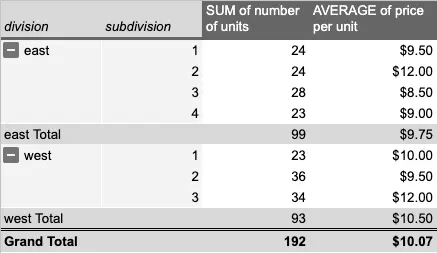
Notion pivot tables in short: Notion does not have pivot tables. The closest native feature is a grouped view with a calculations row, which handles one level of grouping and basic sums. For anything beyond that, the practical route is getting the database into a spreadsheet: a CSV export if you only need it once, or a real-time sync to Google Sheets if you want the pivot to stay current.
Pivot tables answer questions like "revenue by client by quarter" or "tasks per assignee per status" in a few clicks. Notion stores exactly this kind of data, which is why "how do I pivot this?" comes up so often. Here are the three options, from no-tools to fully live.
Does Notion have pivot tables?
No. What Notion does have:
- Grouping. Table and board views can group rows by a property, and boards can add one sub-group.
- Calculations. Each group shows a footer with sum, average, min, max, or count for a chosen property.
That combination covers "total deal value per stage" and similar one-level questions. It stops working the moment you need two dimensions at once (stage by owner), a calculated field inside the summary, or a compact cross-tab you can read at a glance. There is no way to build any of that natively, no matter how creative the view setup gets.
Option 1: Grouped views, the native workaround
If your question only has one dimension, stay in Notion. Group the table by the property you care about, then click the footer under the column you want summarized and pick Sum or Average. Boards give you a second visual dimension through sub-grouping, though the calculations still apply per group, not per cell.
Use this when the answer fits in one level of grouping. The moment you catch yourself wishing the groups had columns, move on to a spreadsheet. The Notion spreadsheet guide lists what else a Notion table can and can't calculate.
Option 2: Export once, pivot in Sheets or Excel
For a one-off analysis, export the database: open it, click the three dots in the top right, choose Export, and pick Markdown and CSV. Import the CSV into Google Sheets or Excel and insert a pivot table as usual.
The catch is that the CSV is a snapshot. Edits made in Notion after the export never reach your pivot, so this route fits end-of-quarter reports and other analyses you genuinely run once. If you find yourself re-exporting every week, you are doing option 3 by hand. The full export guide covers the details and the gotchas.
Option 3: A live pivot table that follows your Notion database
This is the setup that removes the busywork. Sync2Sheets keeps a Notion database and a Google Sheet identical in real time, so a pivot table built on the synced data recalculates itself as people edit Notion.
- Install Sync2Sheets from the Google Workspace Marketplace and connect your Notion workspace.
- In any Google Sheet, open the sidebar and pick the database. The first sync lands in seconds.
- Add a new tab and insert your pivot table there, pointing at the synced tab as the source range. Keep the pivot on its own tab; the synced tab belongs to the sync, and anything you place on it can be overwritten on the next update.
- Done. New rows, edited properties, and deleted pages all flow into the synced tab in real time, and the pivot follows.
Two nice extensions once this is running. You can push the pivot summary back into a Notion page as a table block, so the people who live in Notion see the rollup without ever opening Sheets. And you can build a chart from the pivot and embed it in Notion as a live visualization.
Which option fits
| Grouped views | CSV export | Live sync | |
|---|---|---|---|
| Stays current | Yes | No | Yes |
| Multi-dimension pivots | No | Yes | Yes |
| Setup effort | None | Repeats every time | Once |
| Best for | One-level summaries | One-off reports | Recurring analysis and dashboards |
If the question is simple, grouped views are right there. If it is a real pivot you will look at more than once, sync the database and build it in Sheets, where pivot tables have been excellent for fifteen years.
Frequently asked questions
Does Notion have pivot tables?
No. Notion has grouped views with a calculations row (sum, average, count per group), which covers simple one-level summaries. It has no cross-tabulation, no multi-level grouping, and no custom aggregation. For a real pivot table you need a spreadsheet.
How do I create a pivot table from a Notion database?
Two ways. For a one-off, export the database as CSV (three dots, Export, Markdown and CSV), import it into Google Sheets or Excel, and insert a pivot table. For a pivot that stays current, sync the database to Google Sheets with Sync2Sheets and build the pivot on a separate tab pointing at the synced range.
How do I keep a pivot table updated when my Notion database changes?
Use a real-time sync instead of a CSV export. Sync2Sheets mirrors the Notion database into a Google Sheet in seconds, and any pivot table built on that range recalculates automatically. There is nothing to refresh or re-export.
Can I show the pivot table back inside Notion?
Yes. Sync2Sheets can push a Sheets range into a Notion page as a table block, so the pivot summary appears inside Notion and updates as the data changes. You can also build a chart from the pivot in Sheets and embed it in Notion.
Sync Notion to Google Sheets in real time
Use Sheets formulas in Notion, build dashboards, back up your databases, and compare tools. Free 7-day trial.