Table Blocks: Embed Google Sheets Tables in Notion
Push a range of cells from Google Sheets into a Notion simple table. Perfect for pivot summaries, leaderboards, and reports that stay current.
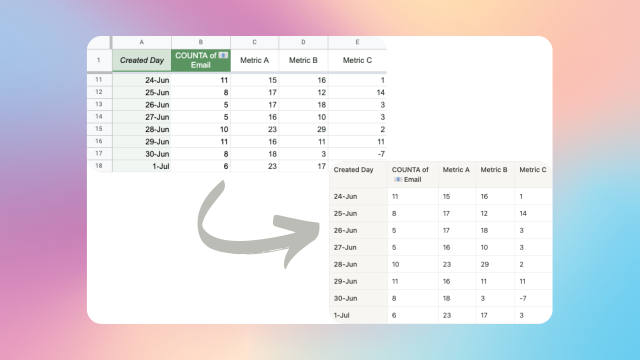
Table blocks sync a range of cells in Google Sheets to a simple table in Notion. Unlike a Notion database, a simple table renders cleanly inside any page, supports headers and formatting, and is perfect for reports, pivot summaries, and read-only breakdowns.
When you want this
- Pivot-table summaries where the raw data sits in a database-synced sheet and the pivot lives in another tab
- Leaderboards ranking your customers, team members, or content by a Sheets formula
- Monthly or weekly reports that render in a Notion page as a clean table
- Any cross-tab aggregation that Notion cannot do natively but Sheets does in one formula
How it differs from a database sync
A synced database gives you a full Notion database with every row editable and every property available as a native Notion property. That's the right tool when you want to work inside Notion's database UI. If you are moving spreadsheet rows into Notion as pages, the Google Sheets to Notion guide compares embedding, a CSV import, and a live sync.
A table block gives you a plain-looking Notion simple table that displays whatever's in a Sheets range. Rows, formulas, pivots, everything flows through. You get:
- Scheduled updates that match your plan (every 2 hours on Starter, every 30 minutes on Advanced, every 15 minutes on Business)
- Full Google Sheets formula support (ARRAYFORMULA, QUERY, FILTER, LAMBDA, pivot output, anything)
- Clean presentation inside a Notion page without the database UI chrome
- No Page ID column, no property-by-property mapping
Setup
- In Google Sheets, lay out the data you want to display. This can be a raw range, a pivot table, or a formula-driven range.
- Give the range a name using named ranges. Point the range at the area including any header row.
- In Notion, copy the link to the page where you want the table to render. Make sure it is a regular page, not a full-page database.
- In the Sync2Sheets sidebar, open Table Blocks and add a new mapping. Paste the Notion page link, select the named range, and save.
- A simple table appears on the Notion page and updates as the sheet updates.
New and deleted rows
Table blocks handle dynamic ranges. If your named range expands (a new row added, a pivot growing), the Notion table grows to match. If rows disappear, they are removed from Notion. No manual maintenance.
Combine with block updates
Most dashboard pages use block updates for top-line KPIs and table blocks for the detail breakdown. For example:
- Top of page: a large heading block driven by a
Total Revenuecell - Middle: a few callout blocks with conditional color based on thresholds
- Below: a table block rendering the full revenue-by-segment pivot
Everything updates together as Sheets recalculates.
See it in action:
Related features
Block Updates: Live Notion Dashboards from Google Sheets
Feed a single Google Sheets cell into a Notion heading, paragraph, callout, or equation. Build Notion dashboards that stay current without extra work.
Charts: Put Google Sheets Charts Inside Notion
Sync your Notion database to Sheets, build any chart in Google Sheets, and embed it back in Notion as a live interactive visualization.
Sync Notion Databases to Google Sheets
Real-time, property-by-property sync between any Notion database and a Google Sheet. Every relation, rollup, select color, and date range preserved.
Try Table Blocks: Embed Google Sheets Tables in Notion free for 7 days
Install Sync2Sheets once and every feature is available, including this one. Plans from $12/month.