Block Updates: Live Notion Dashboards from Google Sheets
Feed a single Google Sheets cell into a Notion heading, paragraph, callout, or equation. Build Notion dashboards that stay current without extra work.
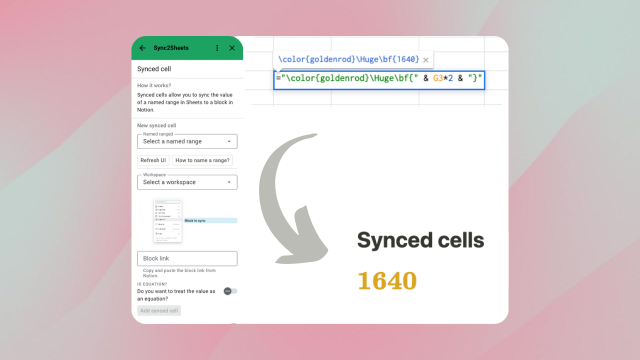
Block updates connect a single Google Sheets cell to a single Notion block, such as a heading, paragraph, callout, toggle, or math equation. You keep the calculation logic in Sheets and let Notion display the result inline, in context, updated automatically.
The problem this solves
Notion is excellent at structured pages and databases but limited at aggregating numbers. You cannot easily put "total revenue this month" at the top of a page, or a KPI headline, or a tax calculation, or a colored status indicator based on a threshold, unless you build it by hand every time data changes. Block updates do that work for you: you write the formula once in Sheets, paste the block link once in Sync2Sheets, and the value stays fresh forever.
What you can build
- KPI headings such as "MRR: $42,180" that update as your revenue sheet recalculates
- Conditional status callouts rendered as colored LaTeX that change as thresholds are crossed
- Inline totals inside a meeting page, a report, a wiki
- Math equations using LaTeX for mathematical notation that stays live
- Stock tickers, exchange rates, sports scores, anything in a formula surfaced inside Notion pages
How it works
- Name the cell in Google Sheets using a named range.
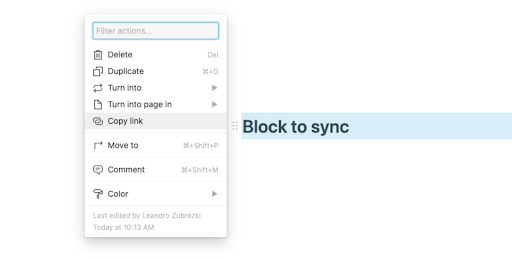
- In Notion, copy the link to the heading, paragraph, callout, list item, or equation block you want to drive.
- In the Sync2Sheets sidebar under Block Updates, paste the block link and select the named cell.
- Choose whether the cell should render as plain text or as a math equation using LaTeX syntax.
From that moment, the Notion block reflects whatever the cell holds. Block updates run on your plan's schedule (every 2 hours on Starter, every 30 minutes on Advanced, every 15 minutes on Business), which is separate from the real-time database column sync.
Math equations and colored output
Because Notion equation blocks render LaTeX, you can drive colored, sized, or formatted output from a single Sheets cell. A formula like:
=IF(A1 > 100, "\\color{green}" & A1 & "\\%", "\\color{red}" & A1 & "\\%")
renders in Notion as a green or red percentage depending on the value. That unlocks traffic-light dashboards and status indicators without plugin soup.
Block updates vs table blocks
- Block updates push one cell to one block. Perfect for a KPI, a headline, a single status indicator.
- Table blocks push a sheet range to a Notion simple table. Perfect for a leaderboard, a pivot-summary report, a list of items.
Most dashboard pages use both: a few block updates at the top for headline metrics and a table block below for the detailed breakdown.
See it in action:
Related features
Charts: Put Google Sheets Charts Inside Notion
Sync your Notion database to Sheets, build any chart in Google Sheets, and embed it back in Notion as a live interactive visualization.
Table Blocks: Embed Google Sheets Tables in Notion
Push a range of cells from Google Sheets into a Notion simple table. Perfect for pivot summaries, leaderboards, and reports that stay current.
Real-Time 2-Way Sync Between Notion and Google Sheets
Sync Notion databases and Google Sheets in real time, in both directions. Pick the direction column by column: Notion to Sheets, Sheets to Notion, or Both ways.
Try Block Updates: Live Notion Dashboards from Google Sheets free for 7 days
Install Sync2Sheets once and every feature is available, including this one. Plans from $12/month.