Real-Time 2-Way Sync Between Notion and Google Sheets
Sync Notion databases and Google Sheets in real time, in both directions. Pick the direction column by column: Notion to Sheets, Sheets to Notion, or Both ways.
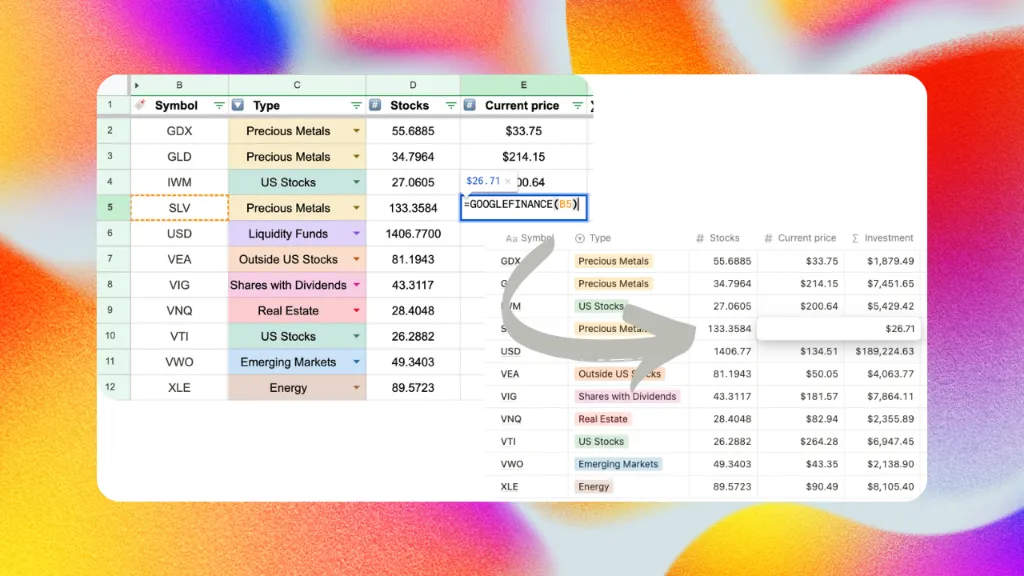
Sync2Sheets syncs a Notion database and a Google Sheet in real time, in both directions, with the sync direction set per column (field-level control, not a single switch for the whole database). Notion edits reach Sheets in seconds, Sheets edits reach Notion in seconds, on every plan, from $12/month. For each column you have three choices:
- Notion Sheets. Edits in Notion appear in Sheets within seconds. Edits in Sheets for that column are ignored.
- Sheets Notion. Edits in Sheets appear in Notion within seconds. The column is driven from Sheets, so a Notion-side edit gets overwritten on the next sync. This is the column type that used to be called an editable column.
- Both ways. Edits in either tool flow to the other.
You set the direction at first sync, and you can change it any time from the column settings in the add-on sidebar.
Why you'd want this
Notion is good at curated, hand-edited data. Google Sheets is good at everything Notion can't do: formulas, charts, pivot tables, external data feeds, anything calculation-heavy. Most sync tools make you pick a side for the whole database. Sync2Sheets lets you mix them column by column, which is what makes it different from database-level 2-way tools like Whalesync and from one-way exporters like Dokin (see the 6-tool comparison).
A few common shapes:
- Live stock prices. Set a "Current Price" column to Sheets Notion and drop
=GOOGLEFINANCE("NASDAQ:AAPL")in Sheets. The price lands in Notion as a normal number property and stays current. - Currency conversion.
=GOOGLEFINANCE("CURRENCY:USDEUR")populates a Notion property without anyone touching Notion. - Web scraping.
=IMPORTXMLpulls ratings, prices, or availability into a Notion content database. - CRM data. Pipe HubSpot, Salesforce, or Stripe into Sheets through a connector, then mirror it into Notion.
- Shared task list. Leave columns like Status or Assignee on Both ways so people can update them from whichever tool they're already in.
- Heavy reporting. Keep the Notion database canonical, compute KPIs in Sheets, write them back to dedicated Sheets Notion columns.
What every direction means in practice
| If you set a column to | Notion edits | Sheets edits |
|---|---|---|
| Notion Sheets | sync to Sheets | are overwritten |
| Sheets Notion | are overwritten | sync to Notion |
| Both ways | sync to Sheets | sync to Notion |
There's no merge step and no conflict prompt. Whichever side writes last wins. In practice this rarely bites, because each cell tends to belong to one tool at a time.
Which property types support which directions
Most Notion property types support all three directions:
- Title, Rich Text, Number, Checkbox
- URL, Email, Phone
- Select, Multi-select, Status
- Person, Date, Relation
- Icon (emoji)
A few types are always Notion Sheets, because they have no writable round-trip:
- Formula, Rollup (Notion computes the value)
- Created time, Created by, Last edited time, Last edited by (Notion stamps these)
- Unique ID, Button, Verification
- Files (uploads aren't supported)
The add-on hides the direction picker for these and treats them as read-only.
How fast it is
Real-time on every plan. Notion edits reach Sheets in seconds via Notion's official webhooks. The reverse path goes through Google Drive push events at the same speed. A 10-minute reconciliation pass catches anything a push might have dropped.
The per-plan sync schedule (Starter 2h, Advanced 30 min, Business 15 min) is a separate thing. It only applies to block updates and table blocks, not to database columns.
Setup
- Sync the Notion database to a Google Sheet.
- When the first-sync card shows the column picker, choose Notion Sheets, Sheets Notion, or Both ways for each column.
- Done. From that point on, changes flow according to each column's setting.
To change a column's direction later, open Edit database in the add-on sidebar and adjust the picker for that column.
Related features
This is the database column 2-way sync. Two adjacent features overlap with it:
- Page creation: turn new rows in Sheets into new Notion pages.
- Block updates: drive a Notion heading, paragraph, or callout from a single Sheets cell. Useful for dashboards.
You can use all three in the same database.
See it in action:
Related features
Block Updates: Live Notion Dashboards from Google Sheets
Feed a single Google Sheets cell into a Notion heading, paragraph, callout, or equation. Build Notion dashboards that stay current without extra work.
Sync Notion Databases to Google Sheets
Real-time, property-by-property sync between any Notion database and a Google Sheet. Every relation, rollup, select color, and date range preserved.
Page Creation: Make Notion Pages from Sheets Rows
Add a row in Google Sheets, get a new page in Notion. Bulk-create pages from imports, forms, or any sheet using the DRAFT and NEW keywords.
Try Real-Time 2-Way Sync Between Notion and Google Sheets free for 7 days
Install Sync2Sheets once and every feature is available, including this one. Plans from $12/month.