Sync Notion Databases to Google Sheets
Real-time, property-by-property sync between any Notion database and a Google Sheet. Every relation, rollup, select color, and date range preserved.
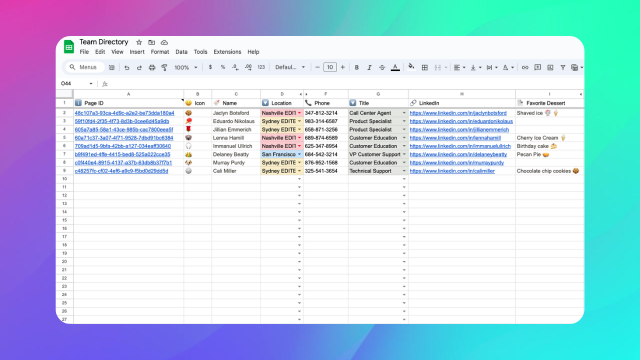
This is the core feature: a Notion database synced to a Google Sheet, live, both ways. Every property type comes through with its formatting intact. Notion edits hit Sheets in seconds via Notion's webhooks; the reverse path is just as fast through Google Drive events. Each column's direction is picked separately. See 2-way sync for how that works. Connect once and every Sheets capability (formulas, pivots, charts, Apps Script) works on the same data that lives in Notion.
What gets synced
Every property Notion exposes through its API syncs to a column in your sheet:
- Title, Rich Text, URL, Email, Phone with hyperlinks and inline formatting preserved
- Number with the original format (currency, percent, thousands separator) applied natively in Sheets
- Select and Multi-select with the original colors applied through data validation and conditional formatting
- Status with the same group coloring as Notion
- Checkbox as a native Google Sheets checkbox
- Date, Date range split into Start date and End date columns so they work with
NETWORKDAYS,DATEDIF, and filters - Person, Created by, Last edited by showing workspace member names
- Files and Media as direct links to the files
- Formula and Rollup with the computed value
- Relation with the page title rendered (not the raw ID) using the original page's title property
Page metadata is also included: Page ID (used to map rows back to Notion), Created Time, Last Edited Time, and Icon.
Real-time, both ways, not polling
Sync2Sheets listens to Notion's official webhooks for Notion-side changes and Google Drive push events for Sheets-side changes. When a page or cell gets created, edited, or deleted, the other side catches up in seconds without waiting for a timer. A 10-minute reconciliation pass runs as a backstop in case a push gets dropped. For rollups and formulas, where Notion doesn't always emit an event, you can trigger a full database scan to refresh every row.
Setup in under a minute
- Open a Google Sheet and launch the Sync2Sheets sidebar from the Extensions menu.
- Share the Notion database you want to sync with the Sync2Sheets integration in Notion.
- In the sidebar, click Connect a database and pick the database from the list.
- Choose a sheet tab (or let Sync2Sheets create one). The first sync runs immediately.
From that moment every Notion change appears in Sheets, and no manual refresh is needed.
Why teams use this over manual exports
Exporting a Notion database to CSV is a one-time snapshot. The moment your Notion data changes, the export is stale. Sync2Sheets solves that: the sheet is a live mirror, not a copy. That unlocks:
- Dashboards that recalculate the moment someone edits a page in Notion
- Backups that stay fresh without a cron job
- Reports you can share with people who don't have Notion access
- BI tool pipelines (Looker Studio, Power BI, Hex) that read from the sheet and see the latest Notion state
If you are comparing approaches, the ultimate guide to exporting Notion databases to Google Sheets walks through the manual export path and when it makes sense to switch to a real sync.
Works with any property combination
You can reorder, rename, hide, or add columns in the sheet without breaking anything. Sync2Sheets tracks columns by internal ID, not by position or name, so your layout changes survive every sync. New properties added in Notion appear automatically. Deleted properties leave the column in place so formulas that depend on it keep working.
See the feature in action:
Related features
Full Database Scan: Refresh Every Row at Once
Force-refresh an entire synced Notion database. Picks up rollup changes, formula updates, and newly-added Notion properties that regular sync may miss.
Page Creation: Make Notion Pages from Sheets Rows
Add a row in Google Sheets, get a new page in Notion. Bulk-create pages from imports, forms, or any sheet using the DRAFT and NEW keywords.
Real-Time 2-Way Sync Between Notion and Google Sheets
Sync Notion databases and Google Sheets in real time, in both directions. Pick the direction column by column: Notion to Sheets, Sheets to Notion, or Both ways.
Try Sync Notion Databases to Google Sheets free for 7 days
Install Sync2Sheets once and every feature is available, including this one. Plans from $12/month.