Comments: Sync Every Notion Comment to Sheets
Every comment created, edited, or deleted in your Notion workspace flows into a dedicated Google Sheet with thread IDs, authors, timestamps, and direct links.
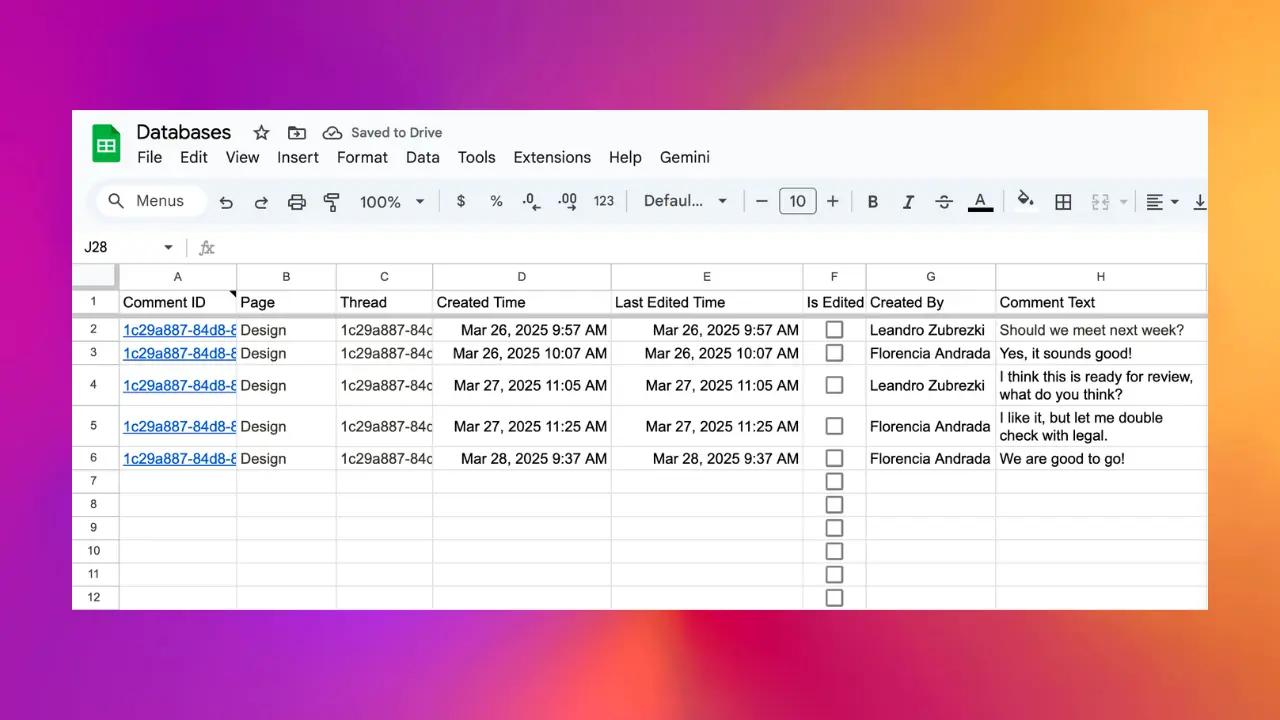
The comments feature captures every comment thread from your Notion workspace into a dedicated Google Sheet. Each new comment, edit, or deletion syncs in real time, giving you a complete searchable record of discussions without extra tooling.
Use cases
- Team activity reporting based on who is commenting, where, and how often
- Compliance and audit trails for regulated workspaces that need a record of discussions
- Search across all discussions using Sheets' native filtering rather than opening pages one by one
- Backup of discussion history outside Notion in case of retention policy changes
- Analytics on support and feedback when teams use Notion comments as a lightweight issue tracker
What gets synced
Each comment becomes a row with these columns:
- Thread: the discussion thread ID with a link back to the original thread in Notion
- Page: the Notion page the comment is on, linked
- Created Time: when the comment was first posted
- Last Edited Time: when the comment was last modified
- Is Edited: a checkbox that is true when the comment has been edited at least once
- Created By: the workspace member who wrote it
- Comment Text: the full text content, including markdown formatting
Every row includes a direct deep link back to the comment in Notion, so jumping from Sheets into the original context takes one click.
Real-time sync
Comments flow through the same webhook-based sync pipeline as database changes:
- New comment → new row appears in the sheet within seconds
- Edited comment → existing row updates in place (Is Edited flips to true)
- Deleted comment → row is removed from the sheet
There is no polling interval and no manual refresh.
Enabling comments sync
- Open the Sync2Sheets sidebar in Google Sheets.
- Go to workspace settings.
- Click Enable Comments.
- A dedicated Comments sheet is created and back-fills your existing comments, then maintains them live.
What you can build with it
Because the comments sheet is a normal Google Sheets tab, everything Sheets can do is available:
- A pivot table of comments by author and week
- A chart showing discussion volume over time
- A filter view of only unresolved or recent comments
- A connected report in Looker Studio or Power BI for cross-team visibility
- A scheduled alert with Apps Script that emails when a new comment appears in a specific thread
Related features
- Audit log tracks schema changes. Pair with comments sync for a complete record of what changed and what was discussed across your workspace.
- Databases syncs the actual page data. Pages and their comments stay aligned automatically because both sync through the same webhooks.
Related features
Audit Log: Track Every Notion Database Change
A dedicated sheet that logs every schema change to your Notion database: properties created, removed, or updated, with timestamps and authors.
Sync Notion Databases to Google Sheets
Real-time, property-by-property sync between any Notion database and a Google Sheet. Every relation, rollup, select color, and date range preserved.
Try Comments: Sync Every Notion Comment to Sheets free for 7 days
Install Sync2Sheets once and every feature is available, including this one. Plans from $12/month.