Audit Log: Track Every Notion Database Change
A dedicated sheet that logs every schema change to your Notion database: properties created, removed, or updated, with timestamps and authors.
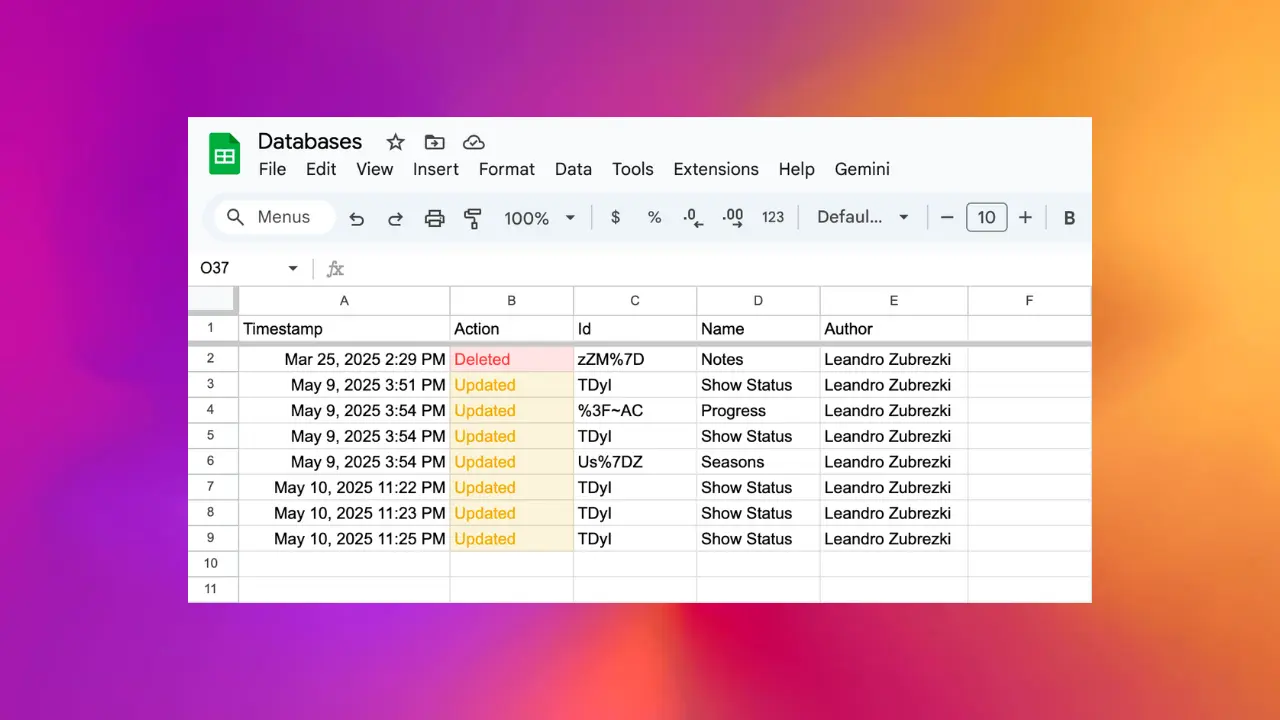
The audit log gives you a persistent, timestamped record of every schema change to a Notion database. When a property is created, removed, or reconfigured, a row is added to a dedicated sheet. You get a compliance-ready trail without any extra tools.
Why teams turn this on
- Compliance requires a record of structural changes to systems that hold regulated data.
- Debugging is easier when you can see exactly when a property was renamed, retyped, or removed.
- Team alignment improves when any member can check the log to understand how the workspace has evolved.
- Governance over shared workspaces becomes tractable when the audit trail is automatic instead of relying on screenshots and Slack messages.
What gets logged
Every time the schema of an audit-log-enabled database changes, a row is added with:
- Timestamp: the moment the change happened
- Action:
Created,Removed, orUpdated - Id: the Notion internal property ID (stable across renames)
- Name: the human-readable property name
- Author: the workspace member who made the change
- Details: extra context (for example, the old and new type for an update, the configuration change, the old and new name on a rename)
The log tracks schema changes to the database structure. Individual page edits, cell-level changes, and comments are not part of this log. For comment tracking see the comments feature. For a full refresh of page data see full database scan.
Where the log lives
A new sheet is created in your spreadsheet with the name prefix (AL) followed by the database name. Example: (AL) Customers. The sheet is append-only: rows are added but never removed by Sync2Sheets, so you keep the full history.
You can freely filter, pivot, and chart on the audit log sheet like any other Sheets tab. Build a monthly report of changes, group by author, alert on removals, anything a spreadsheet can do.
Enabling audit log
- Open the Sync2Sheets sidebar in Google Sheets.
- Select the database you want to track.
- Open database settings and toggle Enable audit log.
- A new
(AL) <database name>sheet appears.
From that moment every schema change is captured.
Availability
Audit log is a paid-plan feature. See pricing for the plans that include it.
Related features
Comments: Sync Every Notion Comment to Sheets
Every comment created, edited, or deleted in your Notion workspace flows into a dedicated Google Sheet with thread IDs, authors, timestamps, and direct links.
Sync Notion Databases to Google Sheets
Real-time, property-by-property sync between any Notion database and a Google Sheet. Every relation, rollup, select color, and date range preserved.
Full Database Scan: Refresh Every Row at Once
Force-refresh an entire synced Notion database. Picks up rollup changes, formula updates, and newly-added Notion properties that regular sync may miss.
Try Audit Log: Track Every Notion Database Change free for 7 days
Install Sync2Sheets once and every feature is available, including this one. Plans from $12/month.