The Comments feature allows you to track and log all comments from your Notion workspace to a dedicated Google Sheet. When enabled, every comment created, updated, or deleted in your workspace is automatically synced, providing a complete record of all discussions.
This is particularly useful for teams who want to keep an audit trail of discussions, generate reports on team activity, or simply have a backup of all comments outside of Notion.
How It Works
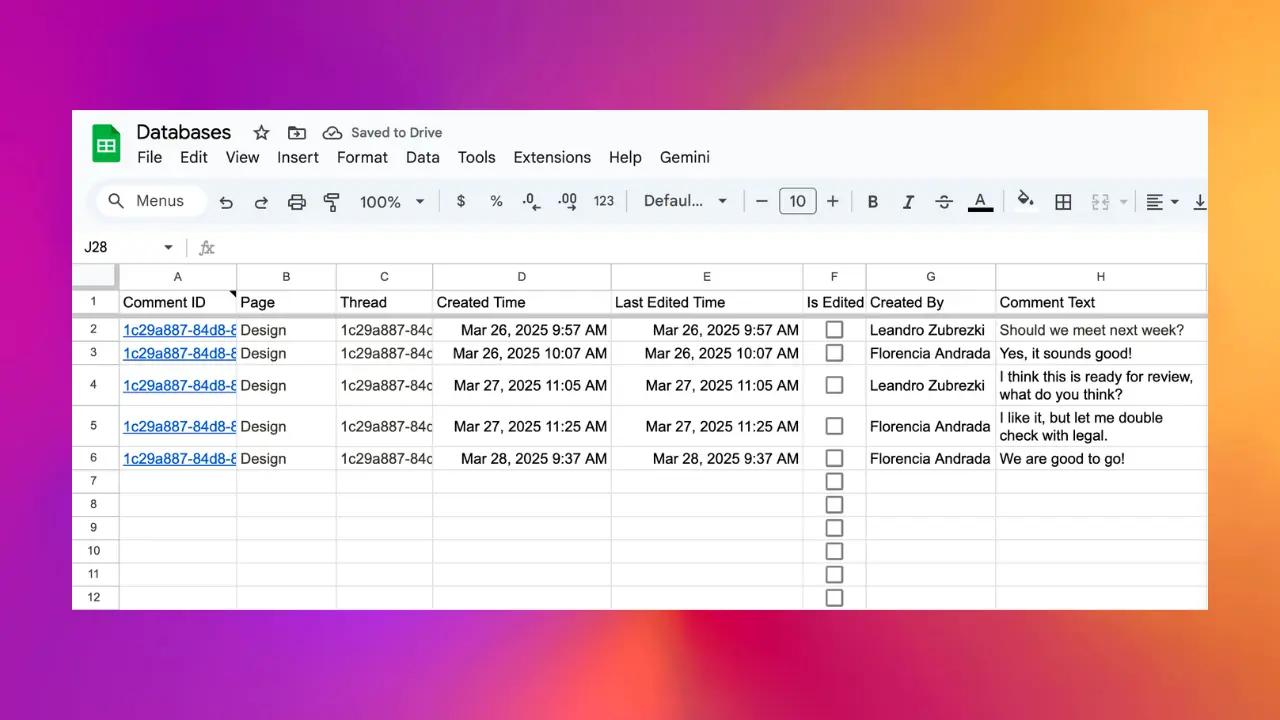
Once you enable the Comments feature from your workspace settings in the Sync2Sheets add-on, a dedicated “Comments” sheet is created in your spreadsheet. The sheet includes the following columns:
- Thread: The discussion thread identifier, with a link back to the original discussion in Notion
- Page: The Notion page where the comment was made
- Created Time: When the comment was originally created
- Last Edited Time: When the comment was last modified
- Is Edited: A checkbox indicating if the comment has been edited since creation
- Created By: The user who wrote the comment
- Comment Text: The full text content of the comment
Real-Time Sync
Comments are synced in real-time through Notion’s webhooks:
- When a new comment is created, it’s immediately added to your sheet
- When a comment is edited, the corresponding row is updated
- When a comment is deleted, it’s removed from the sheet
Each comment entry includes a direct link back to the discussion in Notion, making it easy to jump to the context whenever needed.
Enabling Comments
To enable the Comments feature, open the Sync2Sheets add-on sidebar in Google Sheets and navigate to your workspace settings. Click “Enable Comments” to create the dedicated Comments sheet and start syncing.